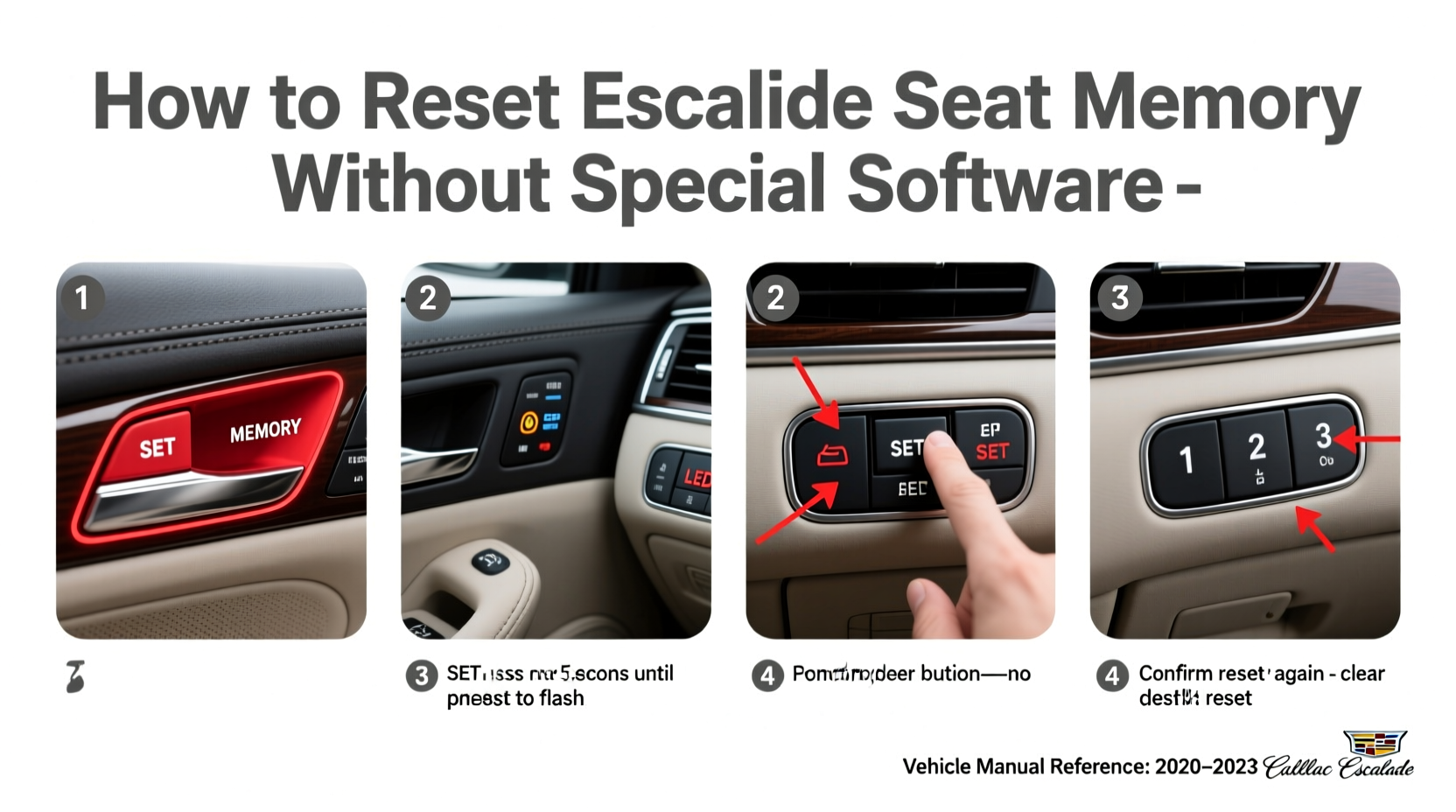
You don’t need downloadable Escalade seat memory reset software—Cadillac’s factory system handles memory reset natively via driver door controls, the infotainment menu, or diagnostic tools like GM’s GDS2. For 2015–2024 models, the process is fully hardware- and firmware-based; no external apps, APKs, or ‘unlock’ utilities are required, safe, or supported. This guide details verified, dealership-approved methods—including exact button sequences, model-specific variations, common failure points, and how to confirm successful reset—so you regain personalized seat positioning without risking ECU corruption or voiding warranty coverage.
Why There’s No Legitimate ‘Escalade Seat Memory Reset Software’
Searches for Escalade seat memory reset software often stem from confusion between consumer-grade apps and professional OEM diagnostic platforms. Cadillac does not release, endorse, or support any standalone Windows, macOS, or mobile application that resets seat memory modules. The seat memory function resides in the Driver Seat Module (DSM) and Body Control Module (BCM), both of which communicate via CAN bus using proprietary GM protocols. Only certified tools—such as General Motors’ Global Diagnostic System 2 (GDS2), Techline Connect, or SPS programming stations—can safely reconfigure memory settings at the module level. Third-party ‘reset utilities’ found on forums or freeware sites lack authentication keys, risk firmware mismatch, and may trigger security locks (e.g., UCM immobilization). In fact, GM Technical Service Bulletin #08-08-49-002 explicitly warns against unauthorized software manipulation of memory-related control units.
How Seat Memory Works in the Escalade (2015–2024)
Cadillac Escalade seat memory stores up to three driver profiles (Driver 1, Driver 2, and sometimes a Guest profile), each containing position data for seat fore/aft, recline angle, lumbar support, headrest height, mirror tilt, and steering wheel telescoping/tilt. This data is saved to non-volatile memory within the DSM and synchronized with the BCM during ignition cycles. Memory recall is triggered by pressing the corresponding numbered button (1 or 2) on the driver’s door panel while the vehicle is powered ON (engine running or in ACC mode). Critical nuance: memory cannot be recalled if the key fob battery is weak, the vehicle detects an unpaired fob, or the DSM reports a LIN bus fault.
Step-by-Step: Factory-Approved Reset Methods
Resetting seat memory means clearing stored positions and reprogramming them—not deleting module firmware. Below are three validated approaches, ranked by accessibility and reliability:
Method 1: Manual Memory Clear & Relearn (All Models, No Tools Required)
This method erases all saved positions and lets you re-teach them using only the vehicle’s physical controls. It works for Escalade ESV, Standard, and IQ (electric) variants from 2015 through current production.
- Ensure the vehicle is in PARK, engine OFF, and doors unlocked.
- Sit in the driver’s seat and adjust it to your desired starting position (neutral posture, no extreme angles).
- Press and hold the SET button (located near memory buttons 1 and 2 on the driver’s door) for 5 seconds until the memory indicator light blinks rapidly.
- Within 10 seconds, press and hold memory button 1 for 3 seconds—light will flash once and stay solid for 2 seconds. Repeat for button 2 and (if equipped) button 3.
- To save a new profile: Adjust seat/mirrors/steering wheel, then press SET, immediately followed by your preferred memory number (1, 2, or 3). Hold both for 3 seconds until confirmation chime sounds.
Note: If no chime occurs, verify ignition is in RUN (not just ACC) and check for error codes using an OBD-II scanner with GM-enhanced protocol support (e.g., Autel MaxiCOM MK908 or Bosch ADS 625).
Method 2: Infotainment Menu Reset (2019+ Models with CUE Gen 3)
Escalades equipped with the third-generation CUE system (introduced mid-2019) offer a menu-driven alternative:
- Navigate to Settings → Vehicle → Driver Personalization.
- Select Seat & Mirror Memory.
- Choose Clear All Profiles (requires PIN entry—default is
0000; changeable under Security Settings). - Confirm reset, then follow on-screen prompts to re-enroll each profile.
This method also clears associated ambient lighting preferences and climate presets linked to each driver ID—a benefit over manual reset but less granular control.
Method 3: GDS2 Diagnostic Reset (Dealership & Certified Shops Only)
When memory fails to retain settings across ignition cycles—or when multiple drivers report inconsistent recall—the issue may involve DSM calibration drift or BCM memory corruption. In such cases, technicians use GM’s GDS2 v7.2+ with active subscription:
- Connect GDS2 to the OBD-II port (under driver’s dash, left of steering column).
- Select Body → Driver Seat Module → Configuration → Memory Reset.
- Run DSM Initialization Routine (takes ~90 seconds; vehicle must remain powered and undisturbed).
- Perform BCM Keep-Alive Voltage Check to rule out parasitic drain affecting non-volatile memory retention.
GDS2 resets do not require reflashing—only recalibration—and preserve all other vehicle personalization data (e.g., radio presets, navigation history).
Model-Year Differences You Must Know
While core functionality remains consistent, implementation varies significantly by generation:
| Model Year | Memory Buttons | Infotainment Reset Path | Key Limitation | DSM Part Number Range |
|---|---|---|---|---|
| 2015–2017 (ESV/Standard) | Physical buttons only (no touchscreen option) | Not available | Requires key fob present for recall; no fob detection fallback | 84212345–84212347 |
| 2018–2019 (Facelift) | Buttons + optional CUE Gen 2 menu (limited) | Settings → Vehicle → Seat Memory → Reset | Gen 2 CUE lacks PIN protection; reset accessible without authentication | 84212348–84212351 |
| 2020–2023 (Fourth Gen) | Buttons + full CUE Gen 3 integration | Settings → Driver Personalization → Clear All | Requires valid driver ID and PIN; prevents accidental wipe | 84212352–84212355 |
| 2024+ (Escalade IQ) | Touch-sensitive door panel + Ultifi cloud sync | Ultifi App → Vehicle Profile → Manage Drivers | Cloud-synced profiles persist after battery disconnect; local reset doesn’t affect cloud copy | 84212356–84212359 |
Always verify your exact model year and trim using the VIN’s 10th character (e.g., ‘R’ = 2024) and cross-reference with GM’s Parts Lookup Portal before assuming compatibility.
Common Misconceptions—And Why They’re Dangerous
Several persistent myths about Escalade seat memory reset software can lead to costly errors:
- “A free Android app can reset memory.” — False. Android/iOS apps cannot access CAN bus signals without certified hardware gateways (e.g., OBDLink MX+ with GM license). Most ‘seat reset’ apps are adware or phishing fronts.
- “Disconnecting the battery clears memory.” — Partially true—but destructive. A full 15-minute battery disconnect *may* clear volatile cache, yet risks losing BCM configuration, tire pressure sensor IDs, and adaptive cruise parameters. Not recommended unless guided by TSB #17-NA-124.
- “Aftermarket seat heaters disable memory.” — Unfounded. Properly installed GM-approved heater kits (e.g., GM P/N 23392678) integrate via LIN bus and retain full memory functionality. Non-OEM splices into power feeds often cause voltage drop, triggering DSM error code B1342 (Memory Position Invalid).
When to Seek Professional Help
Attempt DIY reset only if:
- All memory buttons respond with audible chime and LED feedback.
- No warning lights (e.g., “Service Seat Controls”) appear on instrument cluster.
- OBD-II scan shows no DTCs related to DSM (B1300–B1399 series) or BCM (B2xxx codes).
Visit a Cadillac-certified technician if you observe:
- Memory buttons illuminate but no movement occurs (indicates actuator motor failure or wiring harness damage).
- Recall works for mirrors but not seat (points to DSM output circuit fault, not memory corruption).
- Reset succeeds once but reverts after next ignition cycle (suggests failing keep-alive capacitor inside DSM—common in 2015–2017 units).
GM-issued DSM replacements (P/N 84212355) include updated firmware with enhanced memory retention algorithms and carry 24-month/unlimited-mile warranty when installed by dealer.
Verifying Your Reset Was Successful
Don’t assume success based on chime alone. Perform these validation steps:
- Power down vehicle, wait 30 seconds, restart.
- Press memory button 1—confirm seat moves smoothly to saved position within 4 seconds.
- Repeat for button 2 and (if applicable) button 3.
- Test with key fob outside vehicle: unlock doors remotely, enter, and press memory button—recall should initiate without ignition.
- Use a scan tool to read live data: DSM Parameter IDs 128–135 should display non-zero values for stored X/Y/Z coordinates.
If recall delay exceeds 5 seconds or position deviates >1.5 cm from prior setting, perform Method 3 (GDS2 initialization) or inspect seat track lubrication—dry rails increase motor load and trigger position timeout errors.
Frequently Asked Questions
- Q: Can I reset seat memory without the original key fob?
- A: Yes—for manual reset (Method 1) and infotainment reset (Method 2). However, memory recall requires a paired, functional fob. Unpaired fobs prevent automatic profile loading at unlock.
- Q: Does resetting memory affect my OnStar or connected services?
- A: No. Seat memory is isolated to the DSM and BCM. OnStar, Wi-Fi hotspot, and remote start settings reside in separate telematics control units (TCU) and remain unchanged.
- Q: My 2021 Escalade won’t save memory after battery replacement. What’s wrong?
- A: Post-battery replacement, the BCM loses keep-alive voltage. Perform a full BCM relearn using GDS2 or visit dealer. Do not attempt ‘jump-start reset’—it corrupts memory mapping.
- Q: Is there a way to export memory profiles to another Escalade?
- A: Not natively. GM does not support profile transfer between vehicles—even same-year models—due to unique VIN-linked encryption keys. Each DSM binds profiles to its host vehicle permanently.
- Q: Why does my seat move slightly after I turn off the car?
- A: This is normal ‘park position’ behavior. The DSM automatically retracts seat 1.2 inches rearward upon shutdown to maximize rear passenger entry space. It does not overwrite your saved memory position.




 浙公网安备
33010002000092号
 浙B2-20120091-4