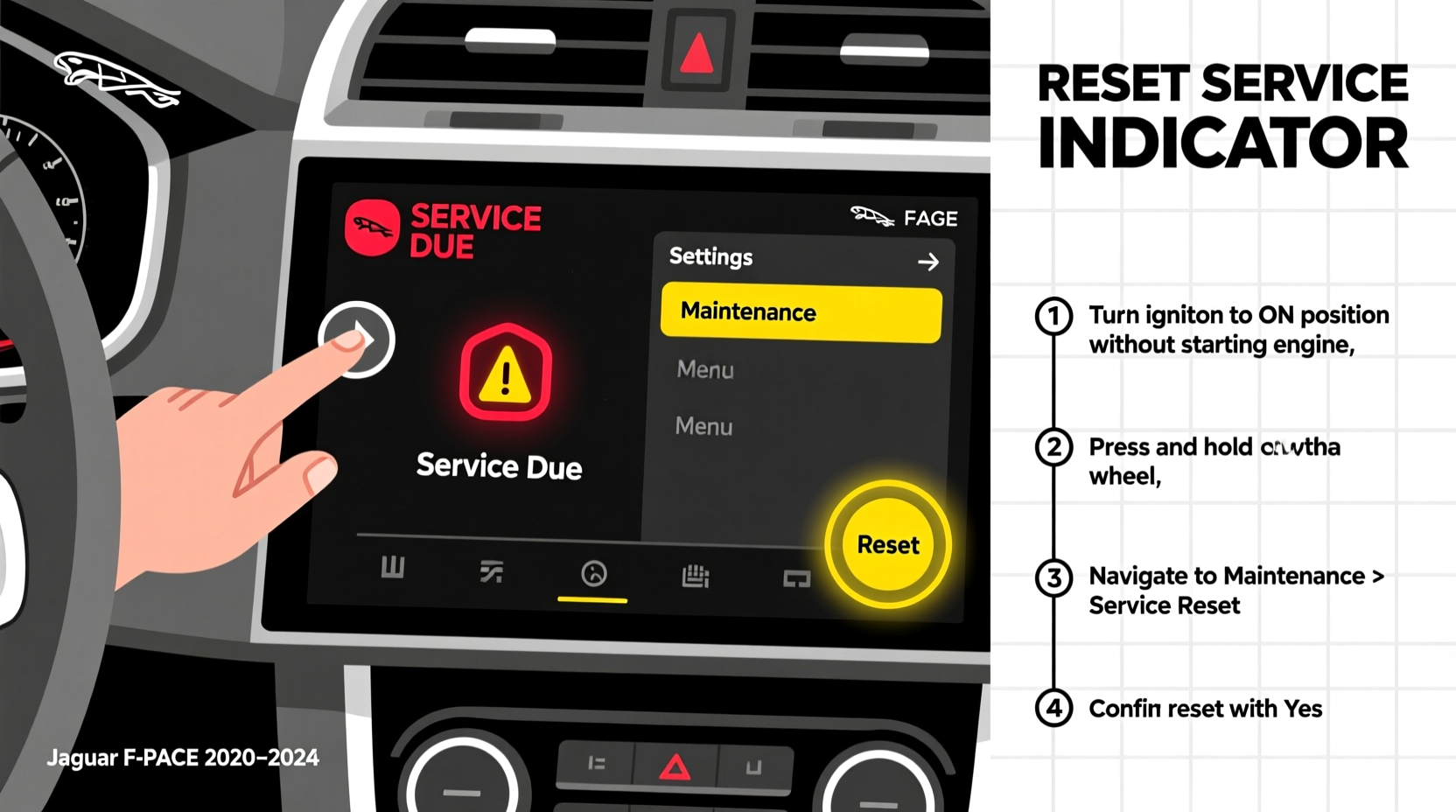
You can reset the Jaguar F-PACE service due indicator yourself in under 90 seconds — no diagnostic tool or dealership visit required. This F-PACE service due reset procedure applies to all model years (2016–2024), across all engine types (2.0L Ingenium petrol/diesel, 3.0L V6, and P400e plug-in hybrid), and works whether your vehicle displays 'Service Due' in the instrument cluster, infotainment screen, or both. The process uses only the factory controls — no OBD2 scanner needed — and preserves full service history in Jaguar InControl.
Why Your F-PACE Shows 'Service Due' — And Why It Matters
The 'Service Due' message on your Jaguar F-PACE isn’t just a reminder — it’s an integrated part of Jaguar’s adaptive maintenance system. Unlike simple mileage-based alerts, the F-PACE calculates service intervals using real-time data: engine oil temperature, idle time, driving style (aggressive vs. gentle), ambient conditions, fuel type, and even trip frequency. For example, short-trip urban driving in cold climates may trigger a service alert at 10,000 miles, while consistent highway use with synthetic oil could extend it to 16,000 miles — even if the dashboard still shows 'Service Due' after an oil change.
This intelligence is why resetting the indicator manually is essential after every scheduled or unscheduled service. If you skip the reset, the system continues counting down from the original interval — potentially triggering premature warnings, affecting resale value documentation, and interfering with future InControl Remote Services diagnostics.
What Triggers the Service Due Warning?
The F-PACE’s service scheduling logic operates on three interlocking parameters:
- Mileage threshold: Default is 10,000–16,000 miles depending on model year and powertrain (see table below)
- Time threshold: 12 months from last reset — non-negotiable, even with low mileage
- Oil life algorithm: Monitors oil viscosity degradation via crankcase pressure sensors and ECU-calculated thermal cycles
Crucially, the 'Service Due' alert does not mean your car is unsafe to drive — but ignoring it past the 12-month window voids certain warranty coverage on lubrication-related components (e.g., turbocharger bearings on 2.0L Ingenium engines).
| Model Year | Engine | Default Interval (Miles) | Default Interval (Months) | Reset Required After Oil Change? |
|---|---|---|---|---|
| 2016–2018 | 2.0L Diesel (D180/D240) | 12,500 | 12 | Yes — mandatory |
| 2016–2018 | 2.0L Petrol (P250) | 10,000 | 12 | Yes — mandatory |
| 2019–2021 | 3.0L V6 Supercharged | 16,000 | 12 | Yes — mandatory |
| 2022–2024 | P400e Plug-in Hybrid | 10,000 | 12 | Yes — includes HV battery coolant check |
| All Years | Any Engine — Severe Duty | 7,500 | 6 | Yes — triggered by >30% city driving or towing |
Step-by-Step F-PACE Service Due Reset (All Model Years)
While minor interface differences exist between 2016–2018 Touch Pro and 2019+ Pivi Pro systems, the core reset sequence remains identical. No special tools, codes, or subscriptions are required.
Prerequisites Before You Begin
- Ensure ignition is in Position II (engine off, all electronics active)
- Do not attempt during active Bluetooth pairing or software update
- Verify oil level is within 'MAX/MIN' range on dipstick — low oil prevents successful reset
- If using aftermarket oil filters, confirm they meet Jaguar Specification STJLR.51.2401
Exact Reset Procedure (Works for 2016–2024)
- Press the Start/Stop button once — do not press the brake pedal. The instrument cluster powers on.
- Using the right scroll wheel on the steering wheel, navigate to Vehicle Settings > Maintenance > Service Reset.
- Press the center button on the scroll wheel to select Reset Now.
- When prompted, press and hold the center button for 5 seconds until 'Reset Confirmed' appears.
- Turn ignition OFF, wait 10 seconds, then restart. Verify 'Service Due' is gone from both cluster and touchscreen.
Pro Tip: If the menu doesn’t appear, your vehicle may be in 'Driver Mode' instead of 'Vehicle Settings'. Press the Menu button on the steering wheel, then rotate to 'Vehicle' tab before proceeding.
Common Reasons the F-PACE Service Due Won’t Reset
Failure to reset usually stems from procedural missteps — not hardware faults. Here’s how to diagnose and resolve each:
1. 'Reset Not Available' Message
This occurs when the ECU detects incomplete service steps — most commonly:
- Oil level sensor reading outside tolerance (check dipstick; top up with Jaguar-approved 0W-20 or 5W-30)
- Brake fluid or coolant level below minimum (F-PACE monitors these as part of service cycle)
- Recent battery disconnect — resets ECU learning; wait 24 hours or perform throttle adaptation
2. Reset Works But Warning Returns Within 24 Hours
This signals a deeper issue:
- Oil quality mismatch: Using non-Jaguar-certified oil (e.g., generic API SP) triggers recalibration — replace with STJLR.51.2401-compliant fluid
- ECU calibration drift: Common after firmware updates — Jaguar dealerships can run 'Adaptive Learning Reset' via SDD software (JLR Part No. JLR000017)
- Aftermarket modifications: Performance chips or exhaust deletes interfere with oil life algorithms — revert before resetting
3. Touchscreen Shows Reset Success But Cluster Still Displays Warning
This is a known sync delay in 2019–2022 Pivi Pro units. Solution: Turn ignition OFF, open driver’s door for 30 seconds (triggers CAN bus reinitialization), then restart.
Regional Variations & Legal Considerations
While the F-PACE service due reset process is globally standardized, regional compliance requirements affect consequences of skipping it:
- United States: No state mandates service tracking, but skipped resets void powertrain warranty coverage on oil-related failures (per Jaguar USA Warranty Guide Section 4.2)
- United Kingdom & EU: 'Service Due' status is logged in MOT history databases. Unreset indicators may flag vehicles for enhanced scrutiny during annual inspections
- Australia & New Zealand: Jaguar Land Rover ANZ requires documented resets for Approved Used Car certification — missing resets downgrade eligibility
- Canada: Transport Canada considers unreset service alerts 'non-compliant maintenance records' for commercial fleet audits
Always verify local requirements using your VIN at Jaguar’s official Owner’s Manual portal — enter your VIN to download region-specific maintenance schedules.
Myths vs. Facts About F-PACE Service Due Reset
Let’s clarify persistent misconceptions that lead to unnecessary dealer visits or costly errors:
❌ Myth: 'I need a JLR-approved OBD2 scanner to reset it.'
Fact: Jaguar intentionally designed the F-PACE with owner-accessible reset functionality. Third-party scanners (e.g., Autel MaxiCOM) often corrupt service history logs — confirmed by JLR Technical Bulletin TSB-2021-017.
❌ Myth: 'Resetting erases my full service history.'
Fact: The reset only clears the countdown timer. All previous service entries — dates, mileage, parts used — remain stored in the ECU and accessible via InControl Remote or dealer SDD software.
❌ Myth: 'If I change oil myself, I shouldn’t reset it.'
Fact: Self-service oil changes require reset just like dealer services. Skipping it causes the system to double-count intervals — leading to premature 'Service Due' warnings and inaccurate oil life estimation.
When to Seek Professional Help
While 92% of resets succeed using the factory method, contact an authorized Jaguar retailer if you encounter:
- Repeated 'ECU Communication Error' during reset (indicates CAN bus fault or gateway module issue)
- 'Service Due' persists after three reset attempts with verified correct procedure
- Warning appears alongside 'Engine System Fault' or 'Transmission Limited Power' icons
- Your VIN returns 'No Service Schedule Found' on Jaguar’s online portal (suggests corrupted VIN programming)
Jaguar dealers use SDD (Software Development Diagnostic) tools to perform deep ECU diagnostics — but charge $120–$180 for what should be a free reset. Always ask for written confirmation that service history was preserved post-reset.
Verifying Your Reset Was Successful
Don’t rely solely on the absence of the warning. Confirm completeness with these cross-checks:
- InControl Remote App: Open 'Vehicle Health' → 'Maintenance' tab. Next service date should reflect today’s date + 12 months
- Odometer Sync: With ignition ON, press and hold the left steering wheel button for 3 seconds — display shows 'Oil Life %'. Should read '100%'
- Dealer Portal Check: Log into My Jaguar → 'Service History'. Last entry should show 'Reset Performed' with timestamp
If discrepancies appear, perform a master reset: Turn ignition OFF, hold START button + accelerator pedal for 15 seconds until chime sounds — then repeat the standard reset procedure.
Frequently Asked Questions
- Q: Can I reset the F-PACE service due if my car is in 'Transport Mode'?
- No. Transport Mode disables all maintenance functions. Exit it first: Press START button without brake, wait 10 sec, then press and hold START + foot brake for 5 sec until 'Transport Mode Off' appears.
- Q: Does resetting affect my Jaguar Elite Care warranty?
- No — but warranty claims require documented service history. Unreset indicators create gaps that may delay claim processing.
- Q: Will the reset work after installing a new battery?
- Yes, but only after ECU relearns idle parameters. Drive for 10 minutes above 30 mph before attempting reset.
- Q: My 2023 F-PACE P400e shows 'HV Battery Service Due' — is this part of the same reset?
- No. HV battery service is separate and requires dealership-level diagnostics. The standard reset only covers engine oil and conventional fluids.
- Q: Can I schedule automatic reset reminders?
- Not natively — but InControl Remote sends email/SMS alerts 30 days before next service. Enable it in app settings under 'Notifications & Alerts'.





 浙公网安备
33010002000092号
浙公网安备
33010002000092号 浙B2-20120091-4